
Frequently asked questions
Ask a Question
Recent questions from F.A.Q
If you are embedding video from web go to Dashboard files select file you want to embed and click Play button on it.
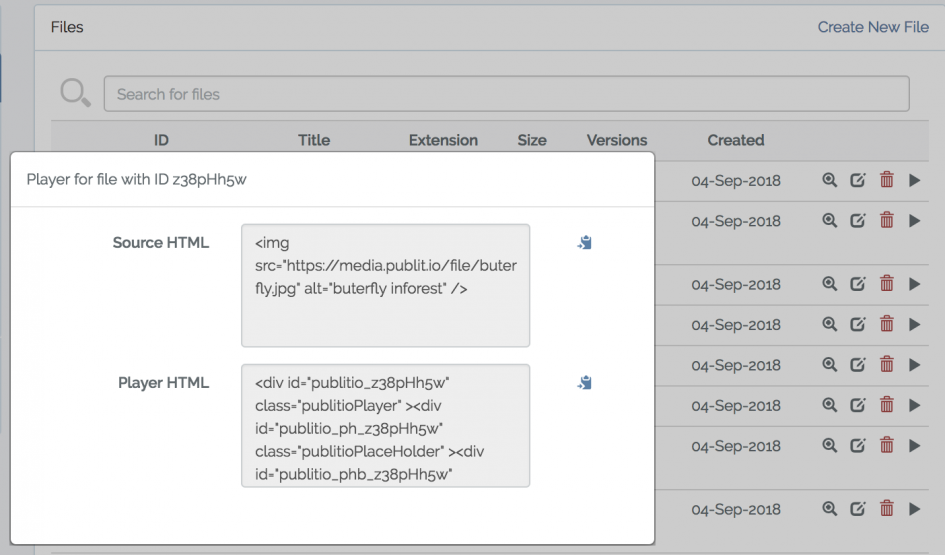
Select Player HTML, copy it and paste it in your website code.
Player will automatically display best and supported format for your visitor so for example if user is visiting from Safari we might display .mov format or if Firefox we will display .ogg or if Chrome .mp4

Which is best to use on my website? Source HTML or Player HTML? Why are there two different ones? Do both play in all browsers?
You can create player directly via Dashboard https://publit.io/dashboard/players and click create player, if you want to create it programmatically check documentation on docs page https://publit.io/docs/#players
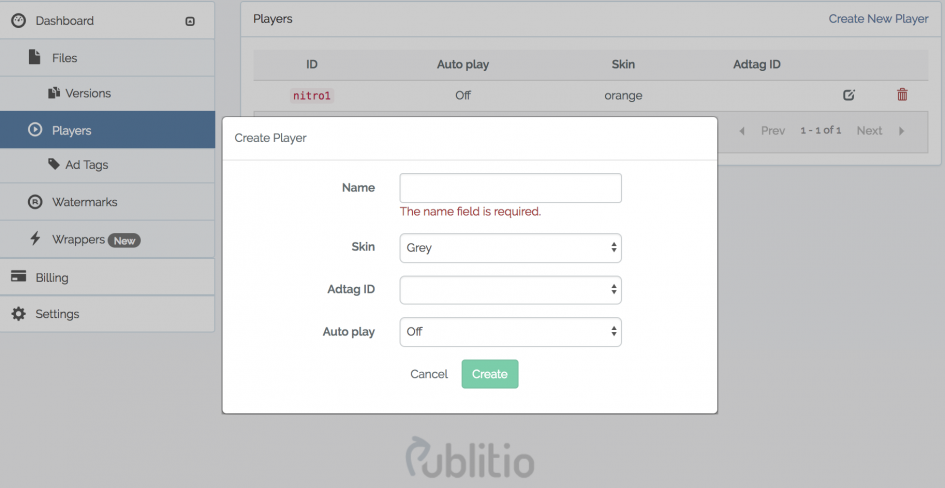
You can change the skin of the player, select Adtag ID if you want to display ADS and you have that set up, and you can chose either to autoplay video or to play on interaction.

Any plans on introducing hexcolor option for the skin?
With Publitio API you can easily transcode your files between formats. Supported extensions (output formats) are:
For images please use jpg, jpeg, png, gif, bmp, webp as extension. You can also transcode images to mp4, webm and ogv video formats ;)
For videos use mp4, webm and ogv. You can also transcode videos to jpg, jpeg, png, gif and webp image formats. We also support video to mp3, wav and ogg audio formats :D
To change format just change extension of the file in url
https://media.publit.io/file/butterflies.jpg > https://media.publit.io/file/butterflies.png
https://media.publit.io/file/butterflies.jpg > https://media.publit.io/file/butterflies.mp4
or for video
https://media.publit.io/file/tummy.mp4 > https://media.publit.io/file/tummy.webm

Seeing PDF support rolled out always reminds me how often we rely on these files without thinking - guides, reports, forms, all piling up across different tools. Viewing them is easy, but the real work starts when you need to edit, reorganize, or update something quickly. I ran into this a lot while cleaning up older project docs and started looking for ways to make the process less painful.
Can URL based transformations help me resize the images?

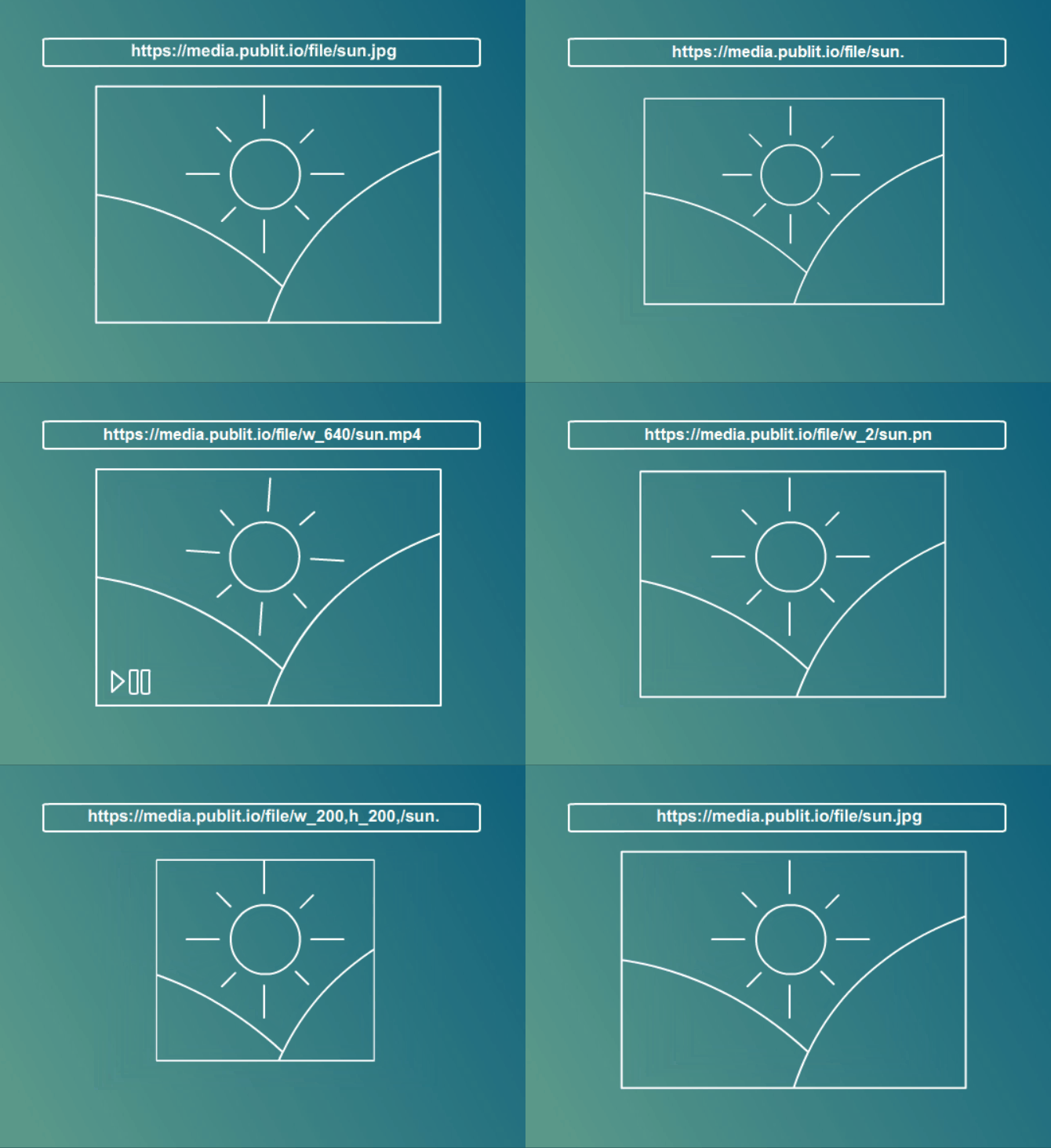
For resizing, please use w (width) and h (height) parameters. Both w and h accept integer values. For example, w_250 sets the width to exactly 250 pixels. You can resize the file by using both the width and height parameters or with only one of them: the other dimension is automatically updated to maintain the aspect ratio. For example, to resize an image or video to 800x600 pixels, format option as w_800,h_600
https://media.publit.io/file/w_600/butterflies.jpg
if you want to resize it based on height
https://media.publit.io/file/w_600/butterflies.jpg
If you want to change the width and height exactly that you want to use
https://media.publit.io/file/w_600/butterflies.jpg
If you are using API check documentation with sample on the right side
https://media.publit.io/file/w_600/butterflies.jpg
Now you can do all of this via API but this is a simple version if you need fast resizing.
What can I do with URL based transformations, what does it mean?

Uncaught ReferenceError: requestId is not defined
Publitio offers URL-Based form of API through which you can do all the file transformations on the fly & instantly, just over the browser, by changing the parameters in the file url. You can use it to transcode your files between formats, for resizing, coping, trimming, watermarking and/or quality adjustment. In plain english: you can change format of any file by just changing extension from .png to .jpg or WEBP when image is in question or video from mp4 to avi via url.

Why is it easy to bypass? Could you elaborate? Has this issue been addressed? Is this a reliable way to keep content safe?
Follow this link and you will find all information regarding Wordpress integration on the right side

You have embeded an audio file in this blog post. Where can I find a tutorial that explains how I can embed an audio file as well?
Thank you!
Follow this link and you will find all information regarding Javascript integration on the right side

Loop Videos + Seek buttons + Playback speed are part of Player Customisation
How to use NODE JS SDK?
Follow this link https://publit.io/docs/?js#introduction and you will find all information regarding Javascript integration on the right side
This endpoint creates new watermark, that you can later use on Files & Versions in order to protect your images and videos. Right now you can upload png or jpg images as your watermarks and Publitio API will securely stored them for future use. To create watermark via API visit https://publit.io/docs/?php#create-watermark if you want to do it manually go to Dashboard https://publit.io/dashboard/watermarks and click Create new Watermark, find image to upload and enter rest of the information.
When you create watermark make sure to give it a name so you know what it is, also you have option to add position for it from drop down menu.
Padding will move it away specific number of pixels from the position you have selected.
We measure only what was downloaded by that moment, we stream peace by peace so if they leave before full video is downloaded we will calculate for example 20 out of 100mb of bandwidth