
Frequently asked questions
Ask a Question
Recent questions from F.A.Q
This endpoint creates new watermark, that you can later use on Files & Versions in order to protect your images and videos. Right now you can upload png or jpg images as your watermarks and Publitio API will securely stored them for future use. To create watermark via API visit https://publit.io/docs/?php#create-watermark if you want to do it manually go to Dashboard https://publit.io/dashboard/watermarks and click Create new Watermark, find image to upload and enter rest of the information.
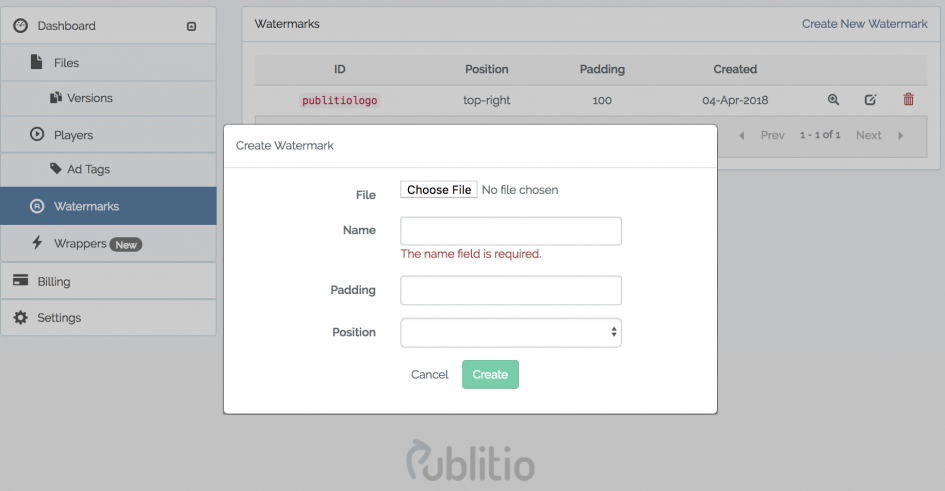
When you create watermark make sure to give it a name so you know what it is, also you have option to add position for it from drop down menu.
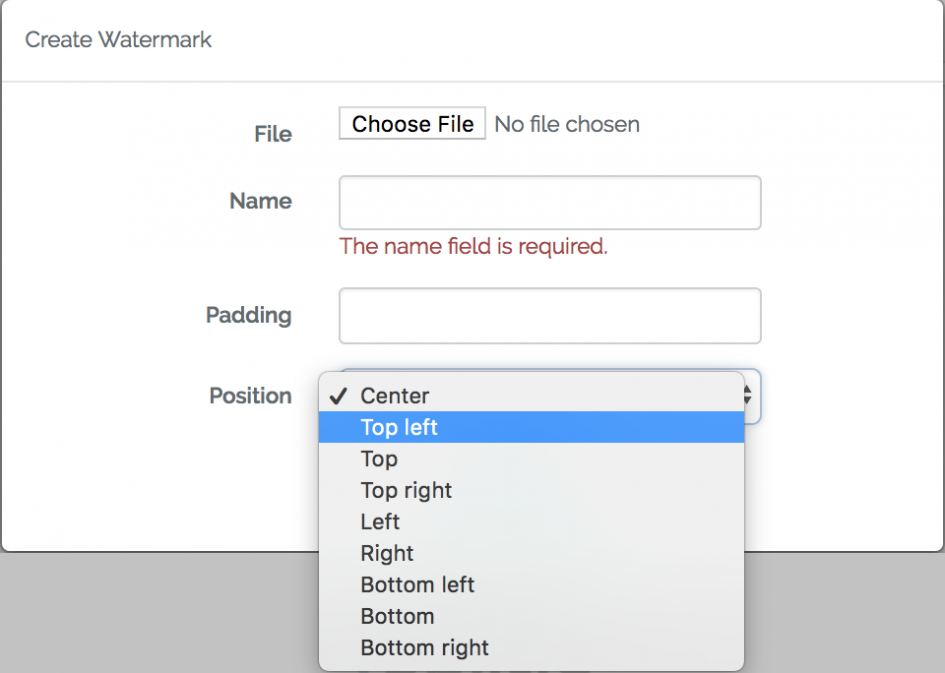
Padding will move it away specific number of pixels from the position you have selected.

Hittade en länk i en artikel om digital teknik i Lidköping och tänkte att jag kunde testa lyckan i lugn och ro. Jag hade haft en ganska tuff period med bara röda siffror på spelkontot. Genom https://swiper.com.se/ fick jag dock en snabb vändning på mina resultat tack vare bra poker. Jag vann plötsligt en rejäl slant på spelautomaterna som täckte allt jag förlorat tidigare. Jag är mycket nöjd med vinsten och turen i Sverige.
If you are embedding video from web go to Dashboard files select file you want to embed and click Play button on it.
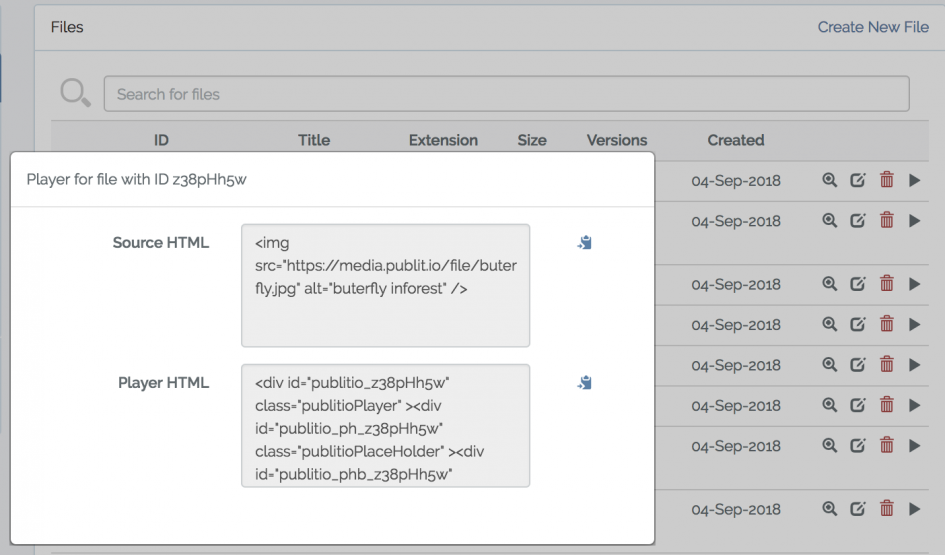
Select Player HTML, copy it and paste it in your website code.
Player will automatically display best and supported format for your visitor so for example if user is visiting from Safari we might display .mov format or if Firefox we will display .ogg or if Chrome .mp4

Which is best to use on my website? Source HTML or Player HTML? Why are there two different ones? Do both play in all browsers?
You can create player directly via Dashboard https://publit.io/dashboard/players and click create player, if you want to create it programmatically check documentation on docs page https://publit.io/docs/#players
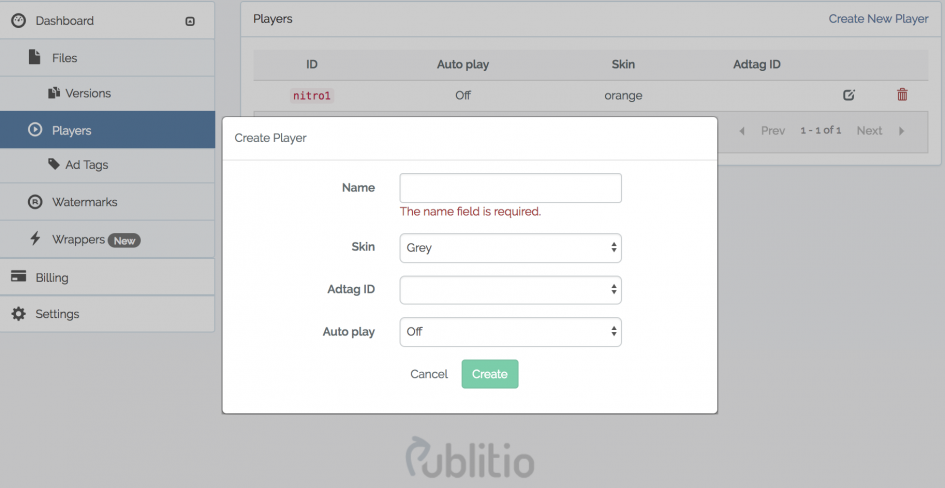
You can change the skin of the player, select Adtag ID if you want to display ADS and you have that set up, and you can chose either to autoplay video or to play on interaction.

Pour beaucoup d'entre nous, la sécurité des données personnelles est le critère numéro un avant de s'amuser en ligne. L'environnement sécurisé de https://royaltiger.fr/bonus m'a immédiatement mis en confiance, grâce à des protocoles de protection de dernière génération. En France, rares sont les sites qui parviennent à combiner une telle sérénité avec un système de paiement aussi efficace et rapide.
With Publitio API you can easily transcode your files between formats. Supported extensions (output formats) are:
For images please use jpg, jpeg, png, gif, bmp, webp as extension. You can also transcode images to mp4, webm and ogv video formats ;)
For videos use mp4, webm and ogv. You can also transcode videos to jpg, jpeg, png, gif and webp image formats. We also support video to mp3, wav and ogg audio formats :D
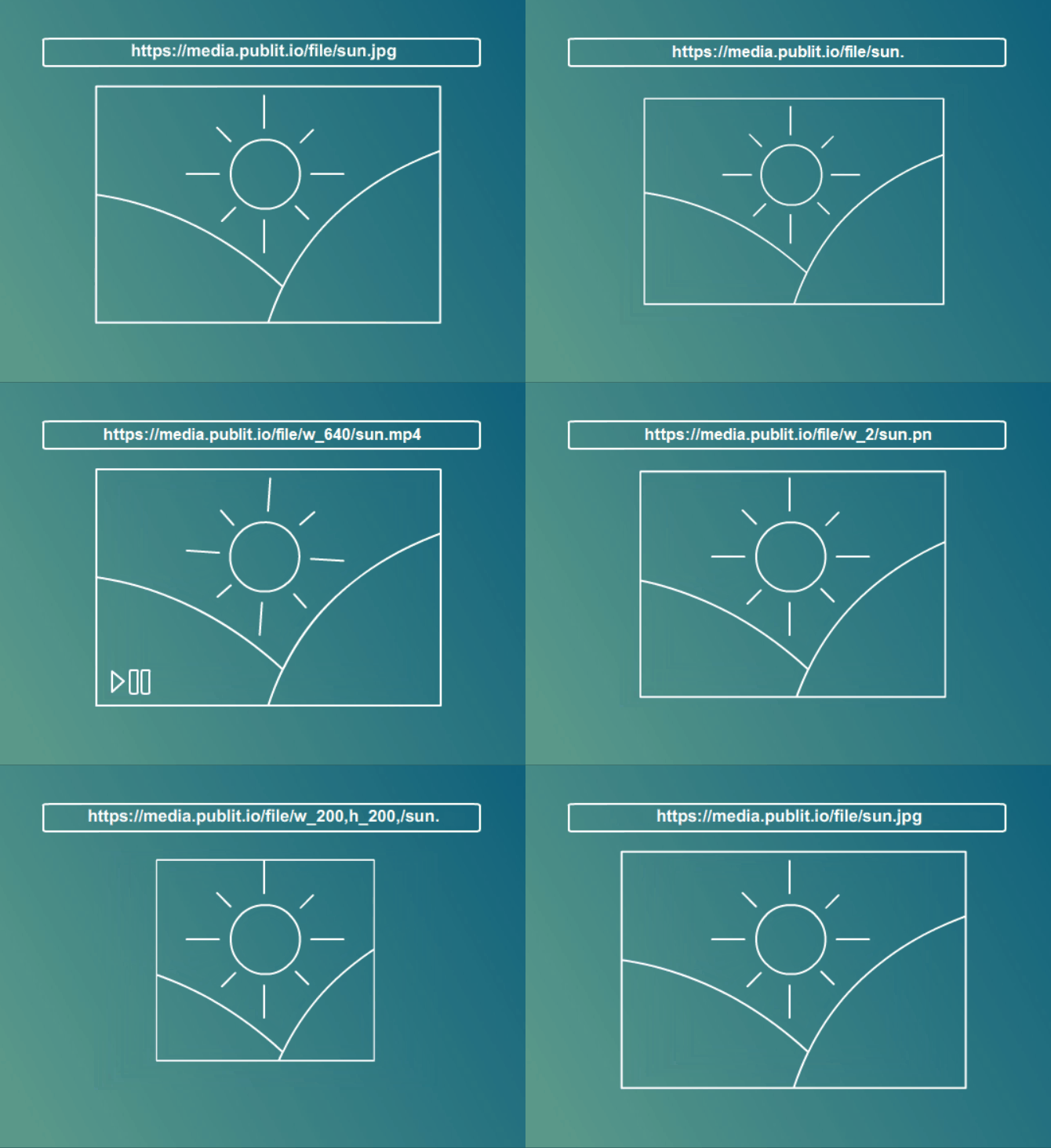
To change format just change extension of the file in url
https://media.publit.io/file/butterflies.jpg > https://media.publit.io/file/butterflies.png
https://media.publit.io/file/butterflies.jpg > https://media.publit.io/file/butterflies.mp4
or for video
https://media.publit.io/file/tummy.mp4 > https://media.publit.io/file/tummy.webm
Hi, I was tired of clickbait news that never got to the point. I tried many apps but they were all messy. Finally I found https://www.bangalinews.in/category/gambling/ and it changed how I see things. The depth of analysis is truly impressive for a daily source. For readers in India, it provides great local context on global events. Now I start every morning with their updates.
Can URL based transformations help me resize the images?

For resizing, please use w (width) and h (height) parameters. Both w and h accept integer values. For example, w_250 sets the width to exactly 250 pixels. You can resize the file by using both the width and height parameters or with only one of them: the other dimension is automatically updated to maintain the aspect ratio. For example, to resize an image or video to 800x600 pixels, format option as w_800,h_600
https://media.publit.io/file/w_600/butterflies.jpg
if you want to resize it based on height
https://media.publit.io/file/w_600/butterflies.jpg
If you want to change the width and height exactly that you want to use
https://media.publit.io/file/w_600/butterflies.jpg
If you are using API check documentation with sample on the right side
https://media.publit.io/file/w_600/butterflies.jpg
Now you can do all of this via API but this is a simple version if you need fast resizing.
What can I do with URL based transformations, what does it mean?

Domain Level Lock Protection is definitely a useful feature, especially if you want to prevent your media from being embedded or played on unauthorized websites. Restricting access to a list of approved domains adds an extra layer of security while keeping content publicly accessible where it should be.For educational platforms like [url=https://thor-fortunes.org/]thorfortune casino[/url], this kind of protection can be particularly valuable. It helps ensure that videos, images, and other learning materials are only available on the official website, reducing the risk of unauthorized sharing or embedding on third-party domains.
Publitio offers URL-Based form of API through which you can do all the file transformations on the fly & instantly, just over the browser, by changing the parameters in the file url. You can use it to transcode your files between formats, for resizing, coping, trimming, watermarking and/or quality adjustment. In plain english: you can change format of any file by just changing extension from .png to .jpg or WEBP when image is in question or video from mp4 to avi via url.
Domain Level Lock Protection is definitely a useful feature, especially if you want to prevent your media from being embedded or played on unauthorized websites. Restricting access to a list of approved domains adds an extra layer of security while keeping content publicly accessible where it should be. For educational platforms like <a href="https://thor-fortunes.org/">thorfortune casino</a>, this kind of protection can be particularly valuable. It helps ensure that videos, images, and other learning materials are only available on the official website, reducing the risk of unauthorized sharing or embedding on third-party domains.
Follow this link and you will find all information regarding Wordpress integration on the right side

You have embeded an audio file in this blog post. Where can I find a tutorial that explains how I can embed an audio file as well?
Thank you!
Follow this link and you will find all information regarding Javascript integration on the right side

Loop Videos + Seek buttons + Playback speed are part of Player Customisation
Yes you can use Publitio on small websites and it's free, reason to use Publitio is that we can offer you free of charge bandwidth and storage for your content and on top of it we can speed up your website.
Our goal is to help you grow and share good word about us.
You are more than welcome to use Publitio for your small website!
We recently talked about how the Digital Asset Management solution can be important for small businesses:
https://publit.io/community/blog/digital-asset-management-system-for-small-businesses
Besides the obvious benefits your website can get with Publitio DAM System, you can always improve your website speed performance by implementing Publitio Media Offloading solution. Read more about it here: https://publit.io/community/blog/digital-asset-management-system-for-small-businesses
Let us know if you have any questions.